Lighting and Atmosphere in Blueprint
Presets, custom moods, palettes, freecam reviews, and water under light.
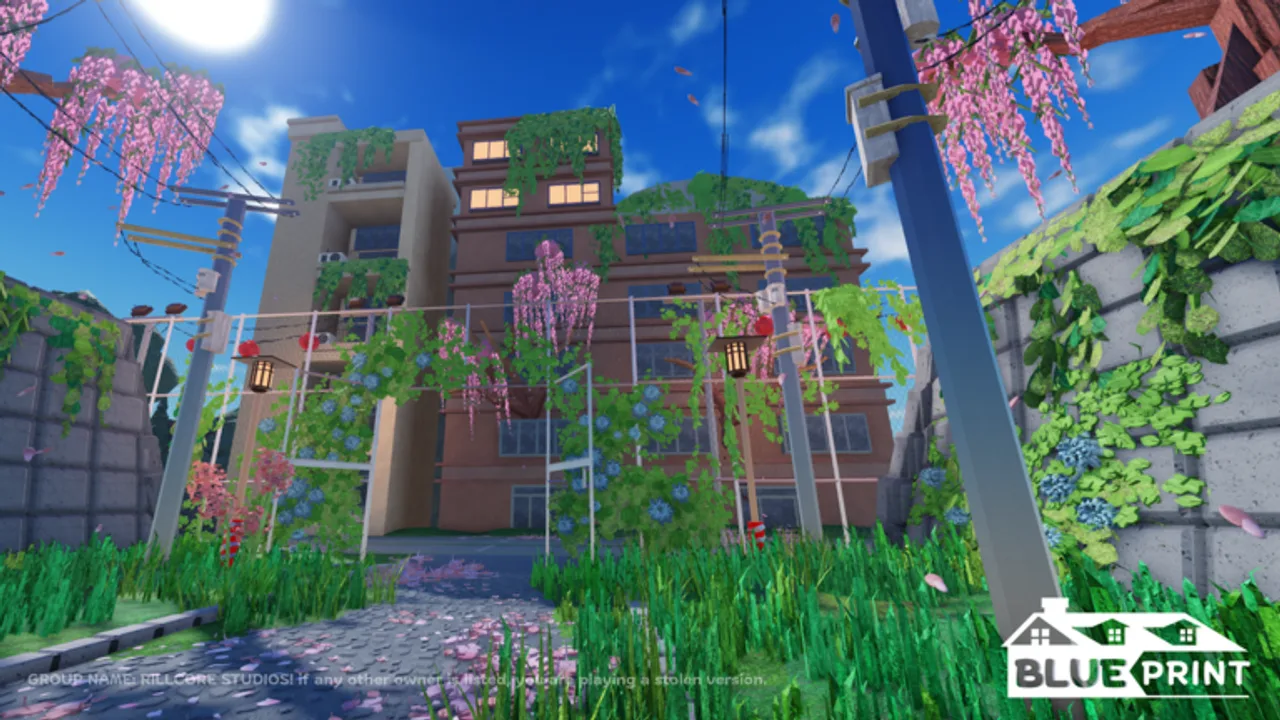
Lighting and atmosphere decide whether a Blueprint plot feels like a portfolio piece or a catalog dump. In this free Roblox sandbox by Riley (rillcore) / Rillcore Studios, you get realistic and soft atmosphere presets, custom lighting knobs (time of day, brightness, warmth, and related mood controls), a color wheel with named saved palettes, dark and light UI themes, freecam for silhouette checks, and pool water that reacts to every lighting choice. There is no money system and no gamepasses—mood comes from taste, not unlocks.
Pair this page with Controls for Edge Scroll and freecam muscle memory, Building Basics for a shell worth lighting, Roofs and Floors for silhouette massing, Pools and Basements for water settings, and Furniture and Decals for materials that actually read under both moods. When friends help, set access carefully via Plot Permissions. Finish sessions against the Build Checklist, and watch Updates for lighting-related fixes during early PC release. Browse every how-to from the Guides Hub.
Why lighting is a build step, not a screenshot trick
Many players paint first and toggle atmosphere once before posting. That order hides problems. Soft light can flatter muddy materials; realistic light can punish neon accents you thought were subtle. Treat lighting like structure: decide a hero mood early, verify under the alternate preset, then lock palettes so co-op partners do not invent a third sunrise every hour.
On a 1024×1024 plot with up to 15 floors, light inconsistency multiplies. A warm lobby under soft dusk next to a cold glass wing under noon realistic mode will never look intentional in freecam flyovers.
Atmosphere presets: realistic vs soft
Blueprint’s atmosphere lighting offers two primary moods:
- Realistic — stronger contrast, clearer shadow edges, harsher material honesty. Great for modern glass, crisp roofs, and “daylight walkthrough” videos.
- Soft — gentler falloff, more forgiving interiors, kinder to busy furniture and dense decal walls. Great for cozy cottages, night-adjacent social spaces, and basement lounges.
Workflow:
- Pick the preset you will screenshot most often.
- Build and paint under that preset for thirty minutes.
- Flip to the other preset and fix anything that collapses (muddy floors, blown-out whites, invisible trim).
- Save named palettes only after both presets pass a quick freecam lap.
Do not chase perfection in both moods at once. Aim for “intentional under hero mood, acceptable under alternate.”
Custom lighting: time of day, brightness, warmth
Beyond presets, custom lighting lets you dial time of day, brightness, warmth, and related atmosphere controls. Use them like a director:
- Morning — cooler brightness for glass towers and pool reflections
- Golden hour — warmer tones that sell wood roofs and porch furniture
- Overcast mid-day — flatter light to judge true material values without drama
- Evening — lower brightness to test whether interior lamps and skylights still guide circulation
Change one axis at a time. If you nudge warmth and brightness together, you will not know which slider broke the pool color. After each tweak, Edge Scroll along the long facade so you see the whole elevation, not a single courtyard corner.
Color wheel, named palettes, and material honesty
The color wheel is useless without discipline. Create named palettes in-game for structure, accents, water, and signage. Naming matters when collaborators join under Plot Permissions—a label like “Facade Warm Stone” beats “Palette 7.”
Palette loop:
- Establish structure colors under your hero atmosphere preset.
- Save the palette with a clear name.
- Add a tighter accent palette for furniture and decals.
- Retest both palettes under soft and realistic light.
- Adjust only after freecam and walk mode (B) agree the materials still read.
Decals and materials do not look the same under soft vs realistic light. A high-contrast poster that pops in soft mode can crush into black under realistic noon. Matte plaster that looked creamy in soft dusk can go chalky when brightness climbs. Always re-check asset ID art and painted walls after a mood change—see Furniture and Decals for placement habits that keep frames readable at walk distance.
Dark and light UI modes
Dark and light UI themes are comfort tools for long PC sessions, not atmosphere lighting. Still, they affect how accurately you paint:
- Light UI can make soft pastel swatches feel darker than they are on the plot.
- Dark UI can make neon accents look calmer in the picker than they render outdoors.
Pick the UI theme that keeps labels readable, then confirm every critical color on the actual plot under your hero atmosphere—not only in the picker. Lighting mistakes often start as UI optical illusions during three-hour builds.
Edge Scroll while dressing exterior light
Exterior lighting work on a huge plot fails when you only orbit one wing. Edge Scroll pans when the cursor hits the screen edge so you can glide along ridges, riverbanks, and street facades without constant recentering. Use it while:
- Aligning warm porch light language across a long elevation
- Checking whether roof overhang shade from Roofs and Floors still reads after a time-of-day change
- Comparing two distant wings that must share the same palette story
Combine Edge Scroll with freecam: pan for continuity, freecam for massing, walk mode for human-scale truth. Full input notes live on Controls.
Freecam for silhouettes under different moods
Freecam is how you judge whether the house still has a silhouette when light changes. Under soft evening, a busy roof can melt into the skybox; under realistic noon, the same roof may look sharp but expose clipping. Routine:
- Freecam from the street approach you care about.
- Toggle realistic ↔ soft without moving the camera.
- Nudge time of day one step warmer or cooler.
- Note which edges die, then fix massing or palette—not only lamps.
- Press B and walk the same approach so avatar-scale contrast matches the flyer shot.
Silhouette failures are usually structure or palette problems pretending to be “lighting bugs.” Fix the shell with Building Basics before blaming atmosphere sliders.
Pools, water settings, and light interaction
Pool water color, transparency, and wave settings interact hard with atmosphere. Crystal water under soft brightness can look milky; deep teal under realistic noon can go almost black. After any lighting change:
- Revisit water color and transparency
- Soften or strengthen waves so motion still reads at the new brightness
- Recolor pool walls if the shell no longer separates from the water shader
- Swim-test with B closed so depth cues match what guests feel
Coordinate details with Pools and Basements. Indoor spa basements usually prefer softer atmosphere and calmer waves; outdoor show pools often want realistic light for sparkle—pick one hero mood and stop fighting both.
The mid-article video is a general Roblox build-polish pass that includes lighting discipline. Steal the habit of reviewing under more than one mood, then apply Blueprint’s native atmosphere and palette tools on your plot.
Co-op lighting etiquette and release expectations
Agree on hero atmosphere + named palettes before friends edit paint. Snapshot multi-select saves of hero rooms. During early PC release, lighting tools can shift with patches—re-verify saved looks after major drops listed on Updates. Run a final pass with the Build Checklist so mood, water, decals, and walk tests are not skipped.
Practice project: one wing, two moods
- Take a finished wing from Building Basics.
- Set soft atmosphere, warm late-day lighting, and save a named structure palette.
- Place two decals and a small furniture set; save an accent palette.
- Edge Scroll the full facade, then freecam the street silhouette.
- Flip to realistic atmosphere and fix any crushed materials or dead trim.
- Tune a courtyard pool’s color, transparency, and waves under both moods.
- Walk the approach with B, then restamp the wing kit if proportions still hold.
When lighting feels intentional, return to the Guides Hub for the next craft gap—or invite collaborators only after Plot Permissions and palette names are clear.
Frequently Asked Questions
Quick answers to the most common questions.
What is the difference between realistic and soft atmosphere in Blueprint?
Realistic lighting emphasizes contrast and material honesty; soft lighting is gentler and more forgiving for busy interiors. Build under your hero preset, then verify the other so materials and decals still read.
Which custom lighting controls should I adjust first?
Change one axis at a time—usually time of day, then brightness, then warmth—so you can tell which slider fixed or broke your facade, pool water, and interior contrast.
Why save named palettes instead of re-picking colors?
Named palettes keep structure and accent colors consistent across a 1024×1024 plot and help collaborators match your plan under plot permissions without inventing new hues each session.
Do pool water settings change when I switch lighting moods?
Water color, transparency, and waves interact with atmosphere. After any mood or time-of-day change, retune water and pool walls, then swim-test with B closed.
How should I review exterior lighting on a large plot?
Use Edge Scroll to pan long facades, freecam to compare silhouettes under soft vs realistic light, then walk the street approach so avatar-scale contrast matches your screenshots.